Playing with LEDs
We'll now explore other methods for playing with LEDs.
On most Arduino-compatible boards, aside from the "Power" LED (if present) that indicates that the board is powered, there is a controllable LED, usually connected to pin D13.
Some boards have additional LEDs. For example, the Adafruit nRF52840 Feather boards have 2 LEDs.
In the following example, we will use LED D13, which is present on almost all boards. You can adapt the pin if the LED is on another pin.
-
Start by deleting all modules from the interface (
Ctrl AthenDel). -
Add a first Software Timer module, like the one you added in the first step tutorial, but this time, don't configure the pin. Leave it set to "Unused". Choose 10 Hz as the frequency.
-
Add a Digital Out module (the "Output" group), drag it into the interface, and configure it by selecting pin "D13" or the one with an LED on the board you're using.
-
Finally, connect the output of the Software Timer module to the input of this Digital Out module.
You should have this:

Upload the code. You should have a blinking LED exactly like in the previous tutorial. The only difference is that you've learned how to connect modules together!
Now select the Software Timer module and duplicate it by typing Ctrl C then Ctrl V, then place the new module to the left of the other modules.
-
Open the properties of this new module, rename it Timer2, then set the frequency to 1 Hz.
-
Finally, connect the output of this module to the input of Software Timer.
You should have this:
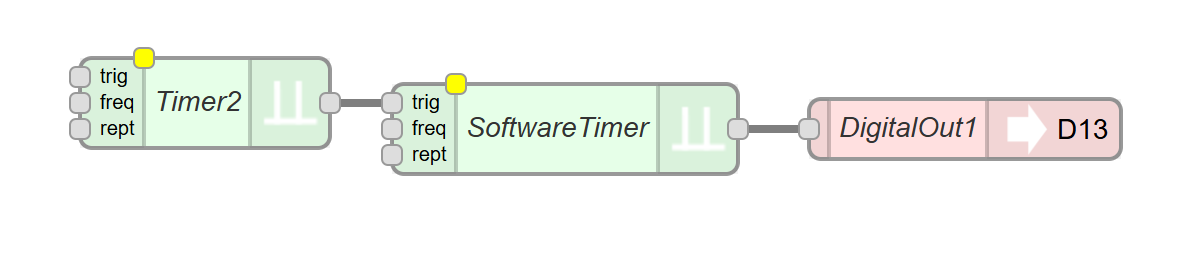
Upload the code. You should have a LED flashing very briefly every second.
Now let's explore the possibilities of combining signals with a logic gate:
-
Delete all connections between the modules by clicking on each connections and by typing
Delete -
Add an And module, which you'll find in the Logic group
-
Make the following connections:
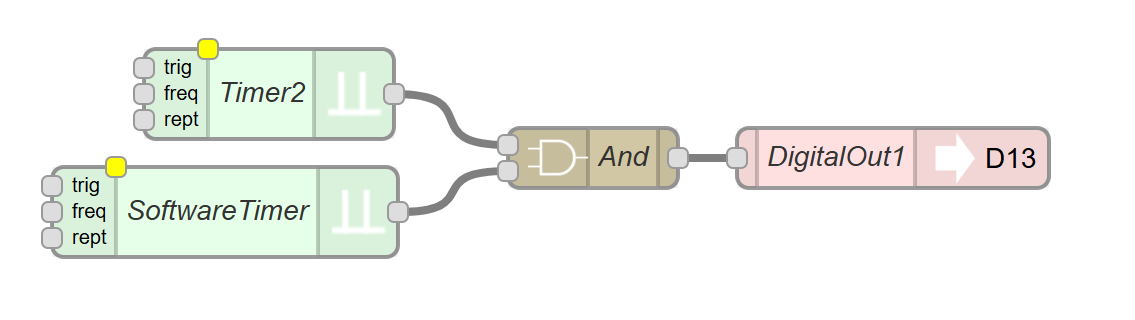
Upload the code. You should have the LED flashing very quickly 5 times every second for half a second.
We will now continue our exploration of modules and discover RGB LEDs.